nPOP
Japanese / English
Introduction
This software allows you to access e-mail on a POP3 mail server on your PC. It provides the function of common remote e-mail access.
The mail displayed by nPOP is only the mail on the present on the server. Therefore, if mail is deleted from your server it will disappear from a list, even if the mail is displayed in the list.
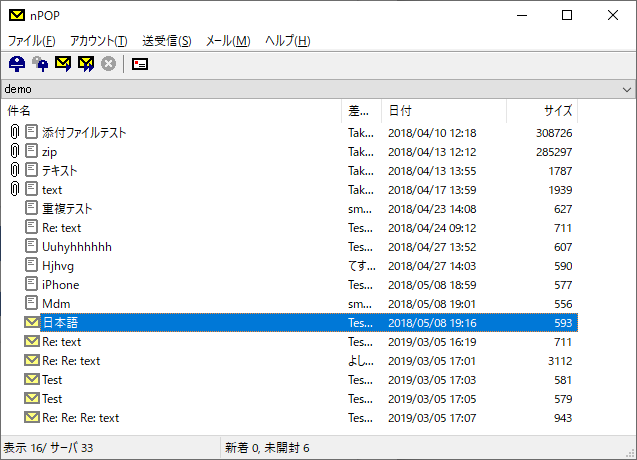
When you connect using nPOP, the mail is listed and you can see the header only. From that list you can select e-mail you want to receive on your PC. This is more efficient than downloading all the e-mail on your PC.
- nPOP for iPhone

Features
- Portable e-mail clients (USB Memory, Floppy Disk)
- Management of the mail on a server
- Receive e-mail (POP3 and APOP)
- Send e-mail (SMTP and SMTP-AUTH and POP before SMTP)
- Multi-account support (round reception is possible)
- Automatic check for new mail
- A thread display of the mail list
- Filters for Routing Received e-mail (Anti spam)
- Simple address book
- TLS/SSL/STARTTLS
- Freeware
Download
nPOP Ver 1.2.6 (2023/6/29)
- English version
- Windows XP, Vista, 7, 8, 8.1, 10, 11
- npop_126_en.zip (size 233 KB)
- Japanese version
- Windows XP, Vista, 7, 8, 8.1, 10, 11
- npop_126_jp.zip (size 247 KB)
To install nPOP, copy the file to a suitable directory and is only performed.
A setup is written in the INI file.
Review
Tools
- nPOPuk
- UKFixes to nPOP
- nPOPQ (Qta Sakamoto)
- This software allows you to access e-mail on a POP3 mail server on your PC. It provides the function of common remote e-mail access.

Copyright © 1996-2023 by Ohno Tomoaki.
All rights reserved.
All rights reserved.